
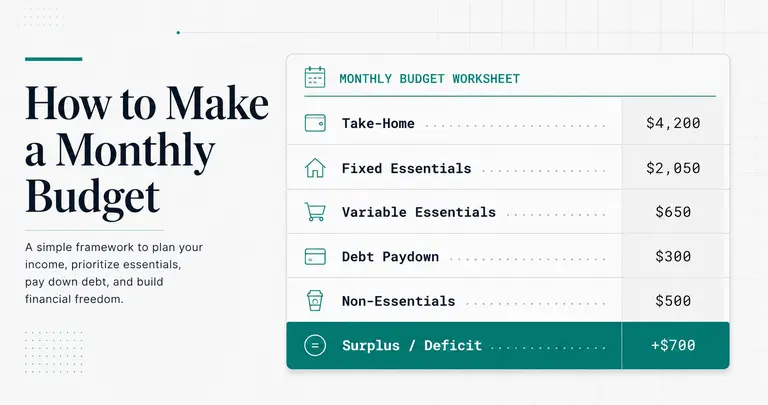
- How to make a monthly budget in seven steps, from real take-home pay to a single surplus-or-deficit number — and why starting from gross pay breaks the math before you begin.
- Who this is written for: people who've attempted a budget before and still ended up negative by week three, despite actually trying.
- Seven steps from take-home calculation to surplus-or-deficit decision — including what to do when the result is negative and the fix isn't simply "spend less."
How to Make a Monthly Budget: The Short Version
To make a monthly budget, start with the pay that actually lands in your account, subtract your fixed and variable essentials, set an amount for extra debt payments, then subtract non-essential spending. What’s left is a single number, a surplus or a deficit, and that number tells you what to do next.
A surplus gets put to work in a set order: emergency fund, then debt, then investing. A deficit gets diagnosed before anything gets cut, because there are two different kinds and the fix for one won’t work for the other.
Most budgets that fall apart by week three were built on the wrong starting number (gross pay instead of take-home) or skipped that diagnosis. A budget is a diagnostic tool first and a spending plan second. The CFPB’s budgeting guide makes the same point: logging what you actually spend is the heaviest lift, and it’s what gives you a realistic picture.
Jump to Your Budget Situation
| Your situation | Jump to |
|---|---|
| No budget system yet | Start at Step 1 |
| You track spending but always come out negative | What to Do When the Budget Is Negative |
| Your budget is positive but debt isn’t shrinking | How to Allocate the Surplus |
The 7-Step Monthly Budget Builder
Step 1 — Calculate Your Actual Monthly Take-Home
The most common budgeting mistake happens before you write a single number down: using your gross salary as the starting point.
Your gross income — the number on your offer letter or before taxes hit — is not the money you have to work with. What matters is your net pay: the amount that actually lands in your bank account after federal and state taxes, Social Security, and Medicare (combined 7.65% for most employees), and any deductions like health insurance or a 401(k) contribution.
Pull up your last two pay stubs and use that net figure. If you’re paid biweekly, multiply one paycheck by 26, then divide by 12 to get your monthly number. If you’re unsure how much is being withheld, the IRS Tax Withholding Estimator will show you in a few minutes.
If your income varies — gig work, freelancing, or hourly shifts — don’t use your average month. Use your lowest month from the past six. This is the realistic baseline your budget needs to survive lean stretches. It’s also the most important framing for anyone learning how to budget money on low income or how to start budgeting with inconsistent paychecks: build from the floor, not the ceiling.
Output: One number — your monthly take-home.
Step 2 — List Your Fixed Essential Expenses
Fixed essentials are the expenses that stay the same every month and aren’t negotiable. These go on the list first because they represent your financial floor — commitments you’ve already made.
This category includes rent or mortgage, car payments, insurance premiums (health, auto, renters), and any loan minimum payments. If you have annual subscriptions billed once a year — like a software plan or a warehouse club membership — divide the annual amount by 12 and include that monthly equivalent here.
One critical distinction: list only the minimum required payment on debts in this step. Any extra payment you want to make toward debt principal belongs in Step 4. This separation matters because it makes your debt paydown decision visible and deliberate rather than buried inside a vague “debt” category. It also surfaces a common trap: minimum payments on revolving debt are designed to keep balances high, not to eliminate them.
Output: A fixed essentials total.
Step 3 — List Your Variable Essential Expenses
Variable essentials are costs that are genuinely necessary but fluctuate month to month. Groceries, gas, public transit, utilities (electricity, water, gas), medical copays, and childcare all belong here.
The challenge is accuracy. Pull three months of bank or credit card statements and find the average for each category. If utilities vary seasonally, use your worst month rather than the average — it’s better to build in headroom than to be caught short every winter.
This step is where a realistic budget diverges from an optimistic one. You’re not writing down what you want to spend on groceries; you’re writing what you actually spend. If you’re setting up a Google Sheets monthly budget template, bank statement data makes the biggest accuracy difference here. For benchmarking, the Bureau of Labor Statistics Consumer Expenditure Survey found the average household spent $78,535 in 2024, with housing alone taking 33.4% of that. If your Step 2 and Step 3 lines look heavy, housing is usually why.
Running total so far: After Steps 2 and 3, you can already see how much of your take-home is committed before a single discretionary dollar is spent.
Output: A variable essentials total.
Step 4 — Debt Paydown Above Minimums
This line item is deliberate, not a leftover. You decide how much extra to put toward debt before you allocate anything to non-essentials — and that order matters.
Debt interest compounds against every other financial goal you have. Paying down principal faster reduces how much interest accrues, freeing up money in future months. Treating extra payments as optional — something you’ll do with “whatever’s left” — means they rarely happen consistently.
If you’re deciding which debt gets the extra payment, the two common approaches are the debt snowball (smallest balance first, for momentum) and the debt avalanche (highest interest rate first, to minimize total cost). Both work; the right one depends on your psychology as much as the math. See our full comparison in the debt snowball vs. avalanche guide.
Under the 50/30/20 budget rule, extra debt payments come from the 20% savings-and-debt bucket — not the 50% needs ceiling. This keeps the accounting clean and prevents extra payments from crowding out essential costs.
If there’s no room for extra payments yet, enter $0. Step 6 will explain why.
Output: An extra debt paydown amount (can be $0 at this stage).
Step 5 — Non-Essential Spending
Non-essential expenses are real, recurring costs that aren’t emergencies — but can be adjusted if the budget requires it. Dining out, streaming subscriptions, clothing, gym memberships, personal care, and entertainment all go here.
Write down what you actually spend, not what you plan to spend. If you spent $340 on restaurants last month, write $340 — not $150 because that sounds more reasonable. The goal of this step is diagnosis, not guilt. A realistic budget requires accurate data.
One useful distinction: separate subscriptions you pay monthly from annual ones already captured in Step 2. This makes it easier to identify fast cuts if Step 6 reveals a deficit.
Output: A non-essential spending total.
Step 6 — Calculate the Gap
Here’s the formula:
Take-home (Step 1) − Fixed Essentials (Step 2) − Variable Essentials (Step 3) − Extra Debt Paydown (Step 4) − Non-Essentials (Step 5) = Monthly Surplus or Deficit
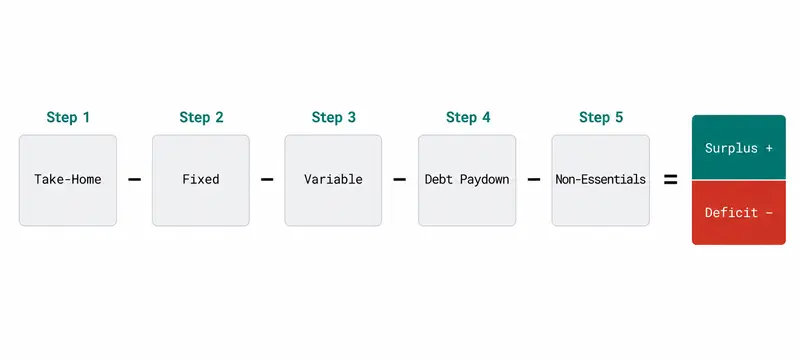
Two outcomes are possible. If the result is positive, you have a surplus — proceed to How to Allocate the Surplus below. If the result is negative, you have a deficit — but before assuming the fix is simply cutting spending, it helps to understand which of two root causes is driving the shortfall.
Root cause one: Essential expenses (Steps 2 and 3) exceed your take-home even before non-essentials enter the picture. This is a structural income-expense gap, and trimming your restaurant budget won’t solve it.
Root cause two: Essential costs are within take-home, but minimum debt payments push the total negative. This is an interest-rate problem — the cost of existing debt, not the volume of spending. For more on how this plays out, see our guide on why minimum payments don’t work.
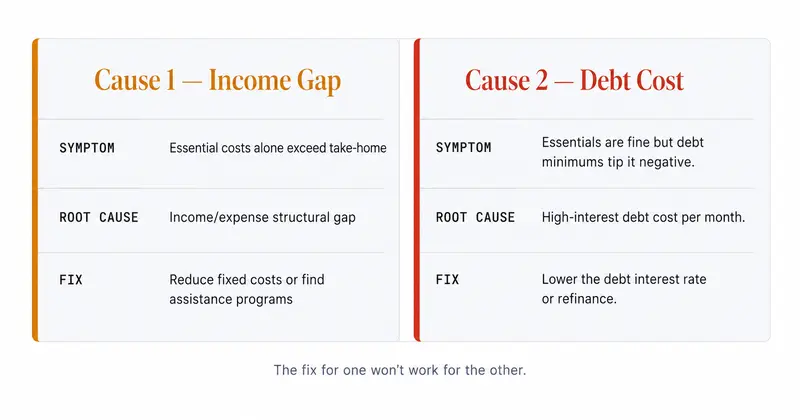
The cause determines the solution. Both are addressed in the next section.
What the Math Looks Like in Practice
Here’s a simplified example with real numbers — adjust each line to match your actual figures.
| Category | Monthly Amount |
|---|---|
| Take-home pay (Step 1) | $3,800 |
| Fixed essentials: rent, car, insurance, loan minimums (Step 2) | $2,100 |
| Variable essentials: groceries, gas, utilities (Step 3) | $620 |
| Extra debt paydown (Step 4) | $150 |
| Non-essentials: dining, subscriptions, personal care (Step 5) | $480 |
| Monthly surplus or deficit (Step 6) | +$450 |
In this example, Step 6 is positive — the surplus goes to Tier 1 (emergency fund) first.
If the Step 2 number were $2,600 instead of $2,100, the same income produces a −$100 deficit. That’s a debt-payment problem (Cause 2), not a spending problem. Cutting the entire $480 in non-essentials would produce a surplus, but the extra $500 in debt minimums is still there every month. Reducing that line is the more durable fix.
Step 7 — Choose a Tracking Method
A budget that isn’t maintained monthly is a one-time exercise, not a financial system. The tracking method you choose determines whether it actually sticks.
Path A — Google Sheets: Free, flexible, and permanently in your control. A Google Sheets monthly budget template gives you a structured starting point without locking you into any app or subscription. For readers who want their spreadsheet connected directly to live bank data, BudgetSheet links your accounts via Plaid and feeds transactions directly into Sheets automatically — turning a manual spreadsheet into a live bank feed. (affiliate link)
Path B — Budgeting apps: Apps like Franklin AI track and categorize spending automatically, which reduces the weekly maintenance time significantly. Best for readers who want automation over customization.
Path C — Pen and paper: The most analog option, and still fully valid. Manual tracking forces deliberate engagement with every transaction and works well for readers who prefer full control or distrust apps.
No method is inherently superior. The one you’ll actually use every month is the right one.
Monthly Budget Calculator
Enter your numbers from Steps 1–5 to see your result.
Enter your monthly take-home to see your result.
What to Do When the Budget Is Negative
A negative budget isn’t a character flaw — it’s diagnostic information. The next step depends entirely on which root cause is driving it.
Cause 1 — Structural income-expense gap
If your essential costs (Steps 2 and 3) already exceed your take-home before you account for any discretionary spending, cutting non-essentials won’t close the gap on its own. The problem is structural, which means the solution has to address either the income side or the fixed cost side. According to the Federal Reserve’s 2025 Report on the Economic Well-Being of U.S. Households, only 63 percent of adults would cover a $400 emergency expense with cash or its equivalent — which leaves more than a third who would need another way to cover it. Structural gaps are far more common than most people assume.
For a deeper playbook on this situation, see our guide on getting out of debt when you’re broke.
When the gap is structural, the fix isn’t willpower — it’s finding expenses you can reduce or programs that offset specific costs. Financial Help Finder is a free tool that searches for assistance programs matched to your situation: utility relief, food support, housing aid, and others most people don’t know exist because they’re not widely advertised.
Check What You Qualify For — Free
Financial Help Finder matches you to federal, state, and nonprofit assistance programs based on your household situation, income, and location. No application required to see what you qualify for.
See What's Available →Cause 2 — Debt payments are the culprit
If your essential living costs are manageable but minimum debt payments in Step 2 are what’s pushing the budget negative, the problem isn’t how much you spend — it’s what existing debt is costing you each month.
High-interest debt, particularly revolving credit card balances, can make a budget mathematically unsolvable even with disciplined spending. Refinancing into a fixed-rate personal loan changes the minimum payment line in Step 2 — often meaningfully. Readers who assume their credit score rules this out may be surprised: lenders evaluate the full picture, and a pre-qualification check doesn’t affect your credit score. Comparing rates takes a few minutes and gives you a concrete number to plug into Step 2 before making any decision. For more context on this path, see our guide on using a personal loan to consolidate credit card debt.
Lower Your Step 2 Number
If high-interest debt is the line item making your budget negative, a personal loan at a lower fixed rate changes that monthly minimum. Checking your rate won't affect your credit score.
Check Your Rate — No Credit Impact →How to Allocate the Surplus
A positive Step 6 result means you have options. The sequence below is a reliable order for putting that money to work.
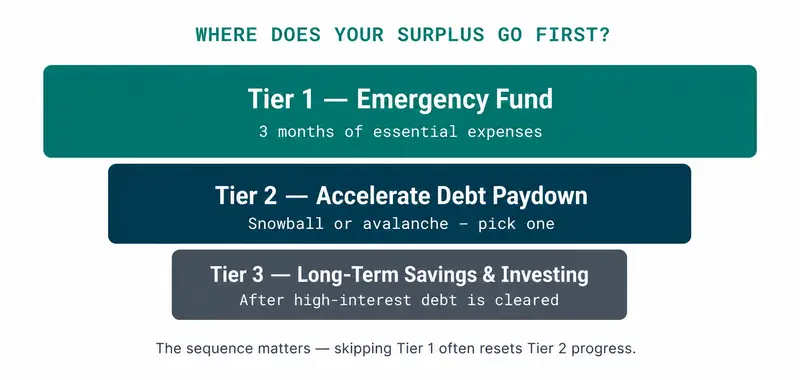
Tier 1 — Emergency fund
Before accelerating debt paydown or investing, build a buffer equal to three months of essential expenses (your Step 2 + Step 3 total × 3). Without this reserve, any unexpected expense — a car repair, a medical bill, an appliance failure — forces new debt, which resets the paydown progress you’ve already made. For a detailed breakdown of how to build and size an emergency fund, see our guide here.
Tier 2 — Accelerate debt paydown
Once the three-month buffer is in place, route the surplus to extra debt payments in Step 4. Use either the snowball or avalanche method — the specific method matters less than maintaining it consistently. Stopping and restarting costs more than choosing the slightly “suboptimal” strategy and sticking with it.
Tier 3 — Long-term savings and investing
After high-interest debt is resolved, the minimum payments you’ve been making become available income. That’s when redirecting toward savings and retirement accounts makes the most sense. Saving is the outcome of a working budget — not the starting point. For guidance on that decision, see investing vs. paying off debt — the math.
Which Fix Matches Your Step 6 Result?
- Negative, and Steps 2 + 3 alone exceed take-home: this is Cause 1, an income-expense gap. Cutting non-essentials won’t close it. Look for programs that offset fixed costs (see the box under Cause 1 above) and work through getting out of debt when you’re broke.
- Negative, but only after debt minimums: this is Cause 2, a debt-cost problem. Compare what a lower fixed rate would do to your Step 2 number before cutting anything. The math is in consolidating credit card debt with a personal loan.
- Positive: follow the three tiers above, starting with an emergency fund sized from your own Step 2 + Step 3 total.
- Positive, and you want a percentage target to check against: compare your result with the 50/30/20 split. If your needs run well past 50%, that confirms where the pressure is.
Frequently Asked Questions
How much of my monthly budget should go to debt payments?
Under the 50/30/20 rule, debt minimum payments fall inside the 50% "needs" bucket alongside rent, groceries, and utilities. The rule splits take-home pay into three buckets: 50% for needs, 30% for wants, 20% for savings and extra debt paydown. Extra payments above the minimum come from either the 20% savings bucket or by trimming the 30% wants bucket. For a full breakdown, see our guide to the 50/30/20 rule.
What if my budget is negative — I spend more than I make?
First, identify which root cause applies. If essential costs alone exceed income before any discretionary spending, the gap is structural — an assistance-program finder (see the box under Cause 1) can surface programs that offset specific fixed costs. If debt minimum payments are what push the total negative, a personal loan at a lower fixed rate may reduce that line in Step 2. Neither situation is permanent, but they require different solutions — and the fix for one won't work for the other.
How do I budget when my income changes each month?
Use the lowest month from the past six as your income baseline — not the average. Build the budget to survive that floor. Surplus months add to your buffer; lean months draw from it. This keeps the math structurally sound even when income isn't predictable, and it's the most realistic approach for freelancers, contractors, and hourly workers with variable schedules.
Should I budget weekly or monthly?
Monthly for the overall plan — that's where the income and expense math lives. Weekly check-ins (10 minutes) help you catch category overspends before they compound. Most people find a quick weekly review combined with a full monthly reset keeps things accurate without becoming a burden.
Should I use a budgeting app or a spreadsheet?
Both work — the difference is control versus automation. A Google Sheets template gives you full flexibility. BudgetSheet bridges the gap by connecting live bank data directly into Sheets via Plaid. Apps like Franklin AI categorize transactions automatically, which suits readers who want less weekly maintenance. The right choice is whichever one you'll actually open every week.
What's the difference between a budget and a spending plan?
Functionally, nothing. A budget is a forward-looking income allocation; a spending plan is the same concept with softer framing. Use whichever word makes you more likely to follow through.
Should extra debt payments come from savings or income?
From current income — the Step 4 allocation — before touching savings. Depleting an emergency fund to pay debt often leads to new debt when the next unexpected expense hits, which cancels the progress. Keep the buffer intact and route extra payments from what's coming in each month. See also: how to build an emergency fund.
How long does it take to see results from budgeting?
Month one: you see the real numbers — that's the diagnosis. Month two: the tracking habit forms and you start catching patterns. Month three: adjustments become natural. Meaningful financial progress — debt decreasing, buffer growing — typically becomes visible between months three and six.